Introduction
Customer Relationship Management (CRM) systems have evolved far beyond simple contact databases. Modern CRM platforms now serve as the central hub for managing customer interactions, sales activities, marketing campaigns, and customer support processes. One of the most powerful features driving this evolution is workflow automation.
CRM workflow automation allows businesses to automate repetitive tasks, streamline communication, and ensure that important processes are executed consistently. Instead of relying on employees to manually complete every step in a customer journey, automated workflows handle routine actions based on predefined rules and triggers.
As organizations seek greater efficiency and improved customer experiences, understanding CRM workflow automation has become essential. This article explains what CRM workflow automation is, how it works, its benefits, common use cases, and best practices for implementation.
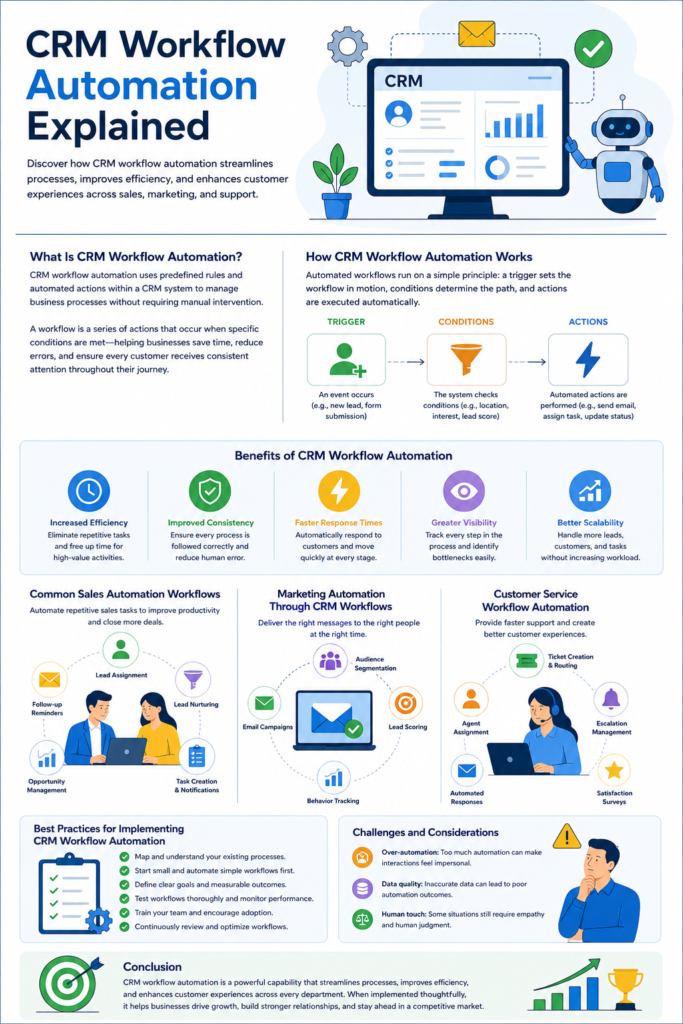
What Is CRM Workflow Automation?
CRM workflow automation refers to the use of predefined rules and automated actions within a CRM system to manage business processes without requiring manual intervention.
A workflow consists of a series of actions that occur when specific conditions are met. For example, when a new lead enters a CRM system, the software can automatically assign the lead to a sales representative, send a welcome email, schedule a follow-up reminder, and update the lead status.
These automated sequences eliminate repetitive administrative work and ensure that every customer receives consistent treatment throughout their journey.
Workflow automation can be applied across various departments, including sales, marketing, customer service, and account management. The goal is to improve productivity, reduce errors, and create smoother business operations.
How CRM Workflow Automation Works
CRM workflow automation operates through a combination of triggers, conditions, and actions.
A trigger is an event that initiates the workflow. Examples include a new lead submission, a completed purchase, a status change, or a customer support request.
Conditions determine whether specific criteria have been met before the workflow proceeds. For example, a workflow may only continue if a lead is located in a particular region or has expressed interest in a certain product.
Actions are the automated tasks performed by the system. These may include sending emails, updating records, assigning tasks, creating notifications, scheduling appointments, or moving contacts through sales pipeline stages.
For instance, imagine a visitor fills out a contact form on a company website. The CRM detects the submission, automatically creates a lead profile, assigns the lead to a sales representative, sends a personalized email, and schedules a reminder for follow-up. All of these steps occur automatically within seconds.
Benefits of CRM Workflow Automation
One of the biggest advantages of workflow automation is increased efficiency. Employees spend less time performing repetitive administrative tasks and more time focusing on high-value activities such as building relationships and closing deals.
Automation also improves consistency. Human error is a common challenge in manual processes. Sales representatives may forget follow-up calls, marketers may overlook lead nurturing opportunities, or support agents may miss ticket updates. Automated workflows ensure that important actions happen every time according to predefined standards.
Another major benefit is faster response times. Customers expect quick communication, especially in today’s digital environment. Automated workflows can instantly acknowledge inquiries, route requests to appropriate teams, and initiate follow-up sequences.
Workflow automation also enhances visibility and accountability. Managers can track every stage of a process and identify bottlenecks more easily. This transparency supports better decision-making and operational improvements.
Additionally, automation contributes to scalability. As businesses grow, manual processes become increasingly difficult to manage. Automated workflows allow organizations to handle larger volumes of leads, customers, and transactions without significantly increasing administrative workloads.
Common Sales Automation Workflows
Sales teams are among the primary beneficiaries of CRM workflow automation. Many sales processes involve repetitive tasks that can be automated effectively.
Lead assignment is one of the most common examples. When a new lead enters the CRM, the system can automatically assign it to the appropriate salesperson based on territory, expertise, workload, or other criteria.
Lead nurturing workflows are also widely used. Prospective customers often require multiple interactions before making a purchase decision. Automated email sequences can provide educational content, product information, and follow-up messages at scheduled intervals.
Opportunity management is another area where automation delivers value. When a deal reaches a certain stage, the CRM can automatically create tasks, notify stakeholders, and update forecasts.
Sales follow-up reminders ensure that no opportunity falls through the cracks. If a salesperson fails to contact a lead within a specified period, the system can generate alerts or escalate the issue to management.
Marketing Automation Through CRM Workflows
Marketing departments use CRM workflow automation to improve campaign effectiveness and customer engagement.
Email marketing automation is one of the most popular applications. Businesses can create personalized email journeys based on customer behavior, interests, and demographics. When a customer downloads a resource, subscribes to a newsletter, or visits specific pages on a website, automated emails can be triggered immediately.
Lead scoring workflows help marketers identify high-quality prospects. The CRM assigns points based on customer actions such as email opens, website visits, content downloads, and webinar attendance. Once a lead reaches a predefined score, it can be automatically transferred to the sales team.
Customer segmentation can also be automated. Contacts are grouped based on behaviors, preferences, or purchase history, enabling more targeted marketing campaigns and improved personalization.
These capabilities help organizations deliver relevant content at the right time while reducing manual effort.
Customer Service Workflow Automation
Customer service teams rely on CRM workflow automation to provide faster and more consistent support experiences.
When customers submit support tickets, automated workflows can categorize requests, assign them to the appropriate agents, and establish priority levels based on urgency.
Acknowledgment emails can be sent instantly to reassure customers that their issues have been received and are being addressed.
Escalation workflows ensure that unresolved tickets receive attention. If a support request remains open beyond a specified timeframe, the CRM can notify supervisors or automatically escalate the case to a higher support tier.
Customer satisfaction surveys can also be automated after ticket resolution. Feedback collected through these surveys helps organizations identify areas for improvement and monitor service quality.
By automating routine support processes, businesses can improve response times and maintain higher levels of customer satisfaction.
Best Practices for Implementing CRM Workflow Automation
Successful CRM workflow automation begins with a clear understanding of existing business processes. Organizations should first document their workflows and identify repetitive tasks that consume significant time and resources.
It is important to start with simple automations before attempting complex workflow structures. Early successes help teams gain confidence and reduce implementation risks.
Businesses should also define clear objectives for each automated workflow. Whether the goal is improving lead conversion rates, reducing response times, or increasing operational efficiency, measurable outcomes help evaluate success.
Regular testing is essential. Automated workflows should be monitored closely to ensure they function as intended and do not create unintended consequences.
Employee training plays a crucial role as well. Staff members need to understand how workflows operate and how automation supports their responsibilities rather than replacing them.
Finally, organizations should continuously review and optimize workflows based on performance data, customer feedback, and changing business needs.
Challenges and Considerations
While CRM workflow automation offers substantial benefits, it is not without challenges.
Poorly designed workflows can create confusion, duplicate actions, or overwhelm customers with excessive communication. Automation should enhance customer experiences rather than make interactions feel robotic.
Data quality is another important factor. Automated workflows rely on accurate information. Incomplete or incorrect customer data can lead to ineffective automation and poor outcomes.
Organizations must also strike a balance between automation and human interaction. Some situations require personal attention, empathy, and judgment that technology cannot fully replicate.
Therefore, businesses should view automation as a tool that supports employees rather than a replacement for meaningful customer relationships.
Conclusion
CRM workflow automation is a powerful capability that transforms how organizations manage customer relationships and internal processes. By automating repetitive tasks, businesses can improve efficiency, enhance consistency, accelerate response times, and scale operations more effectively.
From sales and marketing to customer service, workflow automation helps teams focus on strategic activities while routine processes run automatically in the background. When implemented thoughtfully and supported by quality data and ongoing optimization, CRM workflow automation becomes a valuable asset for driving productivity, customer satisfaction, and long-term business growth.
As CRM technology continues to evolve, workflow automation will remain a key component of modern customer relationship management strategies, enabling organizations to deliver better experiences while operating more efficiently than ever before.